Esp8266 Bootup Sequence
1. Introduction
In the article Esp8266 Partition Table, I introduced the partition table and basic information about ROM, RAM and Flash of the ESP8266 SoC. In this article, I will start introducing the boot up process of the ESP8266 SoC.
There are 2 pieces of information from the Esp8266 Partition Table article that will serve as the premise for this article
ESP8266 has ROM, but not erasable/writable ROM, it needs external memory to store application code.
ROM will contain an executable program (BL0) and some manufacturer-specific information (e.g. MAC address).
A single flash memory on ESP8266 can contain multiple applications and various types of data (calibration data, file systems, parameter storage). For this reason, a partition table will be written at offset 0x8000 (can be changed depending on bootloader size) in memory.
2. A quick review of CPU
CPU (Central Processing Unit), with the name processor sounds very generic and doesn’t tell us what it processes.
Processing here means executing instructions like: add, subtract, multiply, divide, bit shift, bit flip, clear, invert, assign, copy… The number of instructions and optimization level depends on the architecture that this CPU uses. There are many architectures for building CPUs, some notable names: Arm, x86, x64, RISC-V… for more details refer to this link https://en-academic.com/dic.nsf/enwiki/11834151
CPU has computing capability, but what does it know to compute now, it needs us to give it commands. So we need something to store our commands and tell it to go there to read instructions and follow them. That’s why ROM (Read Only Memory) was designed to contain programs that instruct the CPU what to do.
But why ROM? Why not use SD Card(MMC), eMMC, USB, SSD or eSSD? The devices listed above need a controller to operate, need to be initialized first, if we put BL0 here we encounter the chicken and egg problem.
How to connect ROM with CPU? - They use BUS (this is bus at the physical layer), not only ROM but other peripherals are also connected to the BUS. At this point, peripherals connected to the BUS will have addresses. The problem has been solved, CPU will communicate with peripherals through the peripheral’s address on the BUS (these addresses are physical addresses)
So when designing the CPU, right after the CPU exits the POR (Power On Reset) event, it should jump immediately to the ROM address (on the bus) to execute instructions, and this address is called the Reset Vector.
And each CPU manufacturer also chooses their own address, see details here https://en.wikipedia.org/wiki/Reset_vector
3. Back to ESP8266
3.1 The relationship between CPU and ROM
With the guidance above, you will easily accept the information I provide below:
Reset vector is 0x40000080
So we immediately know the internal ROM address on the bus is 0x40000080. Let’s look up the ESP8266 spec to see what other peripherals it has.
Here it is:
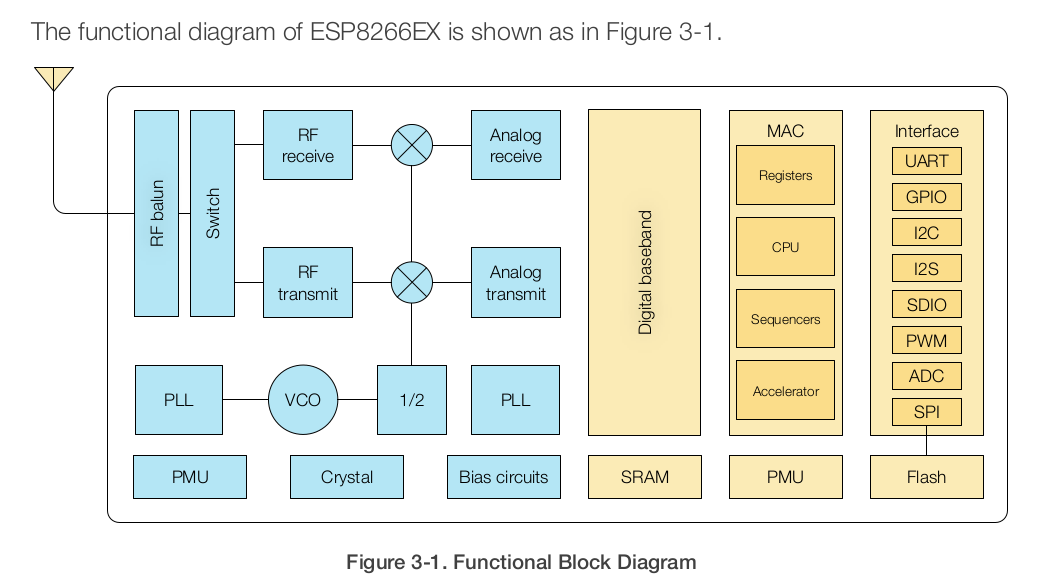
Too many, let me go find its Address map table. Can’t find any document that mentions it, but in its SDK there’s information here.
File: ESP8266_RTOS_SDK/components/esp8266/ld/esp8266.rom.ld
--------------------------------------------------
Some basic information:
PROVIDE ( SPI_sector_erase = 0x400040c0 );
PROVIDE ( SPI_page_program = 0x40004174 );
PROVIDE ( SPI_read_data = 0x400042ac );
PROVIDE ( SPI_read_status = 0x400043c8 );
PROVIDE ( SPI_write_data = 0x40004400 );
PROVIDE ( SPI_write_enable = 0x40004678 );
PROVIDE ( SPI_write_status = 0x400046d0 );
PROVIDE ( Wait_SPI_Idle = 0x4000448c );
PROVIDE ( Enable_QMode = 0x400044c0 );
PROVIDE ( Disable_QMode = 0x40004508 );

PROVIDE ( Cache_Read_Enable = 0x40004678 );
PROVIDE ( Cache_Read_Disable = 0x400047f0 );

PROVIDE ( lldesc_build_chain = 0x40004f40 );
PROVIDE ( lldesc_num2link = 0x40005050 );

PROVIDE ( __register_syscall_table = 0x40007200 );
PROVIDE ( _xtos_set_exception_handler = 0x40007320 );

PROVIDE ( ets_io_vprintf = 0x40007c84 );

PROVIDE ( rom_software_reboot = 0x40000080 );
3.2 Internal ROM boot (BL0)
So we now know that after being powered, the CPU will fetch instructions at address rom_software_reboot = 0x40000080, this is the physical address of internal ROM on the bus.
The executable code on this ROM is pre-loaded by Espressif, providing us with two main functions:
- Initialize UART and provide APIs for users to interact with the SoC, current commands that ROM supports:
// ROM functions
PROVIDE ( uart_rx_one_char = 0x40007840 );
PROVIDE ( uart_rx_one_char_block = 0x400078a4 );
PROVIDE ( uart_rx_readbuff = 0x40007924 );
PROVIDE ( uart_tx_one_char = 0x40007968 );
PROVIDE ( uart_tx_one_char2 = 0x400079a4 );
PROVIDE ( uart_tx_switch = 0x40007a14 );
PROVIDE ( uart_tx_flush = 0x40007a58 );

PROVIDE ( ets_efuse_get_8Mbit_flag = 0x40008208 );
PROVIDE ( ets_efuse_get_spiconfig = 0x40008658 );
PROVIDE ( ets_efuse_program_op = 0x40008828 );
PROVIDE ( ets_efuse_read_op = 0x40008870 );

PROVIDE ( ets_intr_lock = 0x40000f74 );
PROVIDE ( ets_intr_unlock = 0x40000f80 );
PROVIDE ( ets_isr_attach = 0x40000f88 );
PROVIDE ( ets_isr_mask = 0x40000f98 );
PROVIDE ( ets_isr_unmask = 0x40000fa8 );

PROVIDE ( ets_post = 0x40000e24 );
PROVIDE ( ets_run = 0x40000e04 );
PROVIDE ( ets_set_idle_cb = 0x40000dc0 );
PROVIDE ( ets_task = 0x40000dd0 );
- The second function is to load First stage bootloader(BL1) into SRAM and execute it.
3.3 First Stage Bootloader (BL1)
3.3.1 What is First Stage Bootloader?
First Stage bootloader is also executable code to request the CPU to perform tasks that we want.
At this point I have answered the question of why we need a partition table above. For example, in case of using OTA
The main task of BL1 is to read the partition table and find the location of the user application, then load the user application into SRAM and execute it.
3.3.2 Where is First Stage Bootloader stored?
First Stage Bootloader is stored in external flash at offset 0x0000.
3.3.3 How does ROM know where First Stage Bootloader is?
ROM is hard-coded to read First Stage Bootloader at offset 0x0000 of external flash.
3.3.4 How does ROM load First Stage Bootloader into SRAM?
ROM uses SPI to read data from external flash and copy it to SRAM.
3.3.5 Where in SRAM is First Stage Bootloader loaded?
First Stage Bootloader is loaded at address 0x40100000 in SRAM.
3.3.6 How does ROM know to jump to First Stage Bootloader after loading?
After loading First Stage Bootloader into SRAM, ROM will jump to address 0x40100000 to execute First Stage Bootloader.
3.4 User Application
3.4.1 What is User Application?
User Application is the main program that we write to run on ESP8266.
3.4.2 Where is User Application stored?
User Application is stored in external flash at the offset specified in the partition table.
3.4.3 How does First Stage Bootloader know where User Application is?
First Stage Bootloader reads the partition table at offset 0x8000 to find the location of User Application.
3.4.4 How does First Stage Bootloader load User Application into SRAM?
First Stage Bootloader uses SPI to read data from external flash and copy it to SRAM.
3.4.5 Where in SRAM is User Application loaded?
User Application is loaded at address 0x40100000 in SRAM (after First Stage Bootloader finishes).
3.4.6 How does First Stage Bootloader know to jump to User Application after loading?
After loading User Application into SRAM, First Stage Bootloader will jump to the entry point of User Application to execute it.
4. Boot Configuration
ESP8266 supports multiple boot modes, which can be configured through GPIO pins during boot:
| GPIO15 | GPIO0 | GPIO2 | Mode |
|---|---|---|---|
| 0 | 0 | 1 | UART Download Mode |
| 0 | 1 | 1 | Flash Boot Mode |
| 1 | x | x | SD Card Boot Mode |
Most commonly used modes:
- Flash Boot Mode: Normal boot from flash
- UART Download Mode: For flashing new firmware
5. Boot Process Summary
- Power on → CPU starts at reset vector (0x40000080)
- ROM code (BL0) executes:
- Initializes basic hardware
- Checks boot mode from GPIO pins
- If Flash Boot Mode: loads First Stage Bootloader from flash offset 0x0000
- First Stage Bootloader (BL1) executes:
- Reads partition table at offset 0x8000
- Finds and loads user application
- User Application executes
6. Conclusion
Through two articles Esp8266 Partition Table and Esp8266 boot-up sequence, I have introduced the partition table, why we need it, internal ROM boot, First Stage Bootloader, user application, boot configuration and the relationship between them.
References
- ROM code will read the config pins on the SoC to know where the user wants to actively boot from. For example, if the SoC supports eMMC, SD Card, SSD, USB, then ROM code will actively search for code according to the user’s configuration.
- ESP8266 Technical Reference
- ESP8266 Boot Process