Banana Pi R2

The BPI-R2 is Banana Pi’s router board: a MediaTek MT7623N (four Cortex-A7), 2 GB of DDR3, 8 GB of eMMC, SATA, and five Gigabit jacks (four LAN, one WAN) behind an MT7530 switch. I got it for OpenWrt, wrote an empty placeholder post for that back in 2023, and got no further.
In October 2026 I came back to it with the docs, the mainline U-Boot and the Linux device tree, to know what I’m dealing with before I plug anything in. The board wasn’t on the bench then and still isn’t, so there’s no STAR write-up with a result yet. This page is honest about that.
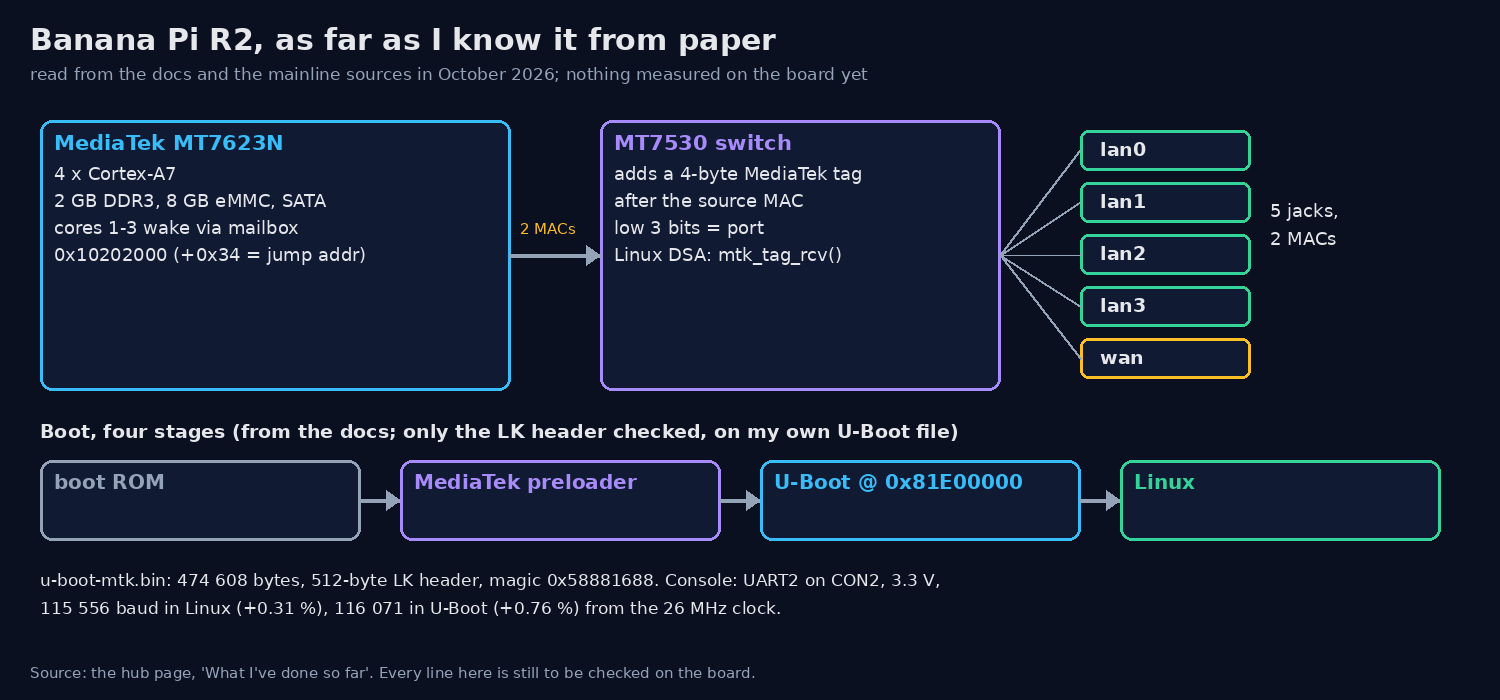 Everything on this page in one drawing: the MT7623N, the MT7530 that turns five jacks into two MACs, and the four boot stages. All from paper, none of it checked on the board.
What reading taught me
The only thing I’ve actually run is a build on my PC: mainline U-Boot with mt7623n_bpir2_defconfig
gives a 474 608-byte u-boot-mtk.bin in 19.7 s. The rest is from the docs and the sources, and none
of it is checked on the board yet.
Boot is four stages: boot ROM, MediaTek preloader, U-Boot at 0x81E00000, then Linux. The U-Boot image carries a 512-byte LK header with magic 0x58881688; that part I did check, on the file.
The five-jacks-on-two-MACs trick is the MT7530 adding a 4-byte MediaTek tag after the source MAC. Its
low 3 bits are the port number, and Linux DSA (mtk_tag_rcv()) turns that into lan0..3 and wan.
Cores 1 to 3 wake through a mailbox at 0x10202000: the jump address goes at +0x34, then three magic
keys, then an IPI.
The console is UART2 on the 3-pin CON2, at 3.3 V. With the 26 MHz clock the divisor gives 115 556 baud in Linux (+0.31 %) and 116 071 in U-Boot (+0.76 %). On paper both are fine. I’d like to see it.
The write-ups
| # | Story | Result | Status |
|---|---|---|---|
| 1 | Build OpenWrt For Banana Pi R2 Customize OpenWrt for Banana Pi R2 |
Not started: no OpenWrt build yet | Pending |
What’s next
Plug it in. Then, in this order: capture a boot log on CON2, settle the 5 V vs 12 V input question (the
docs contradict themselves, so I’ll check the board’s own jack before powering it), read
clk_summary, see the DSA ports come up, and count the CPUs. After that, finally, the OpenWrt build
the old post promised.