An ESP32-S3 that pretends to be a USB webcam
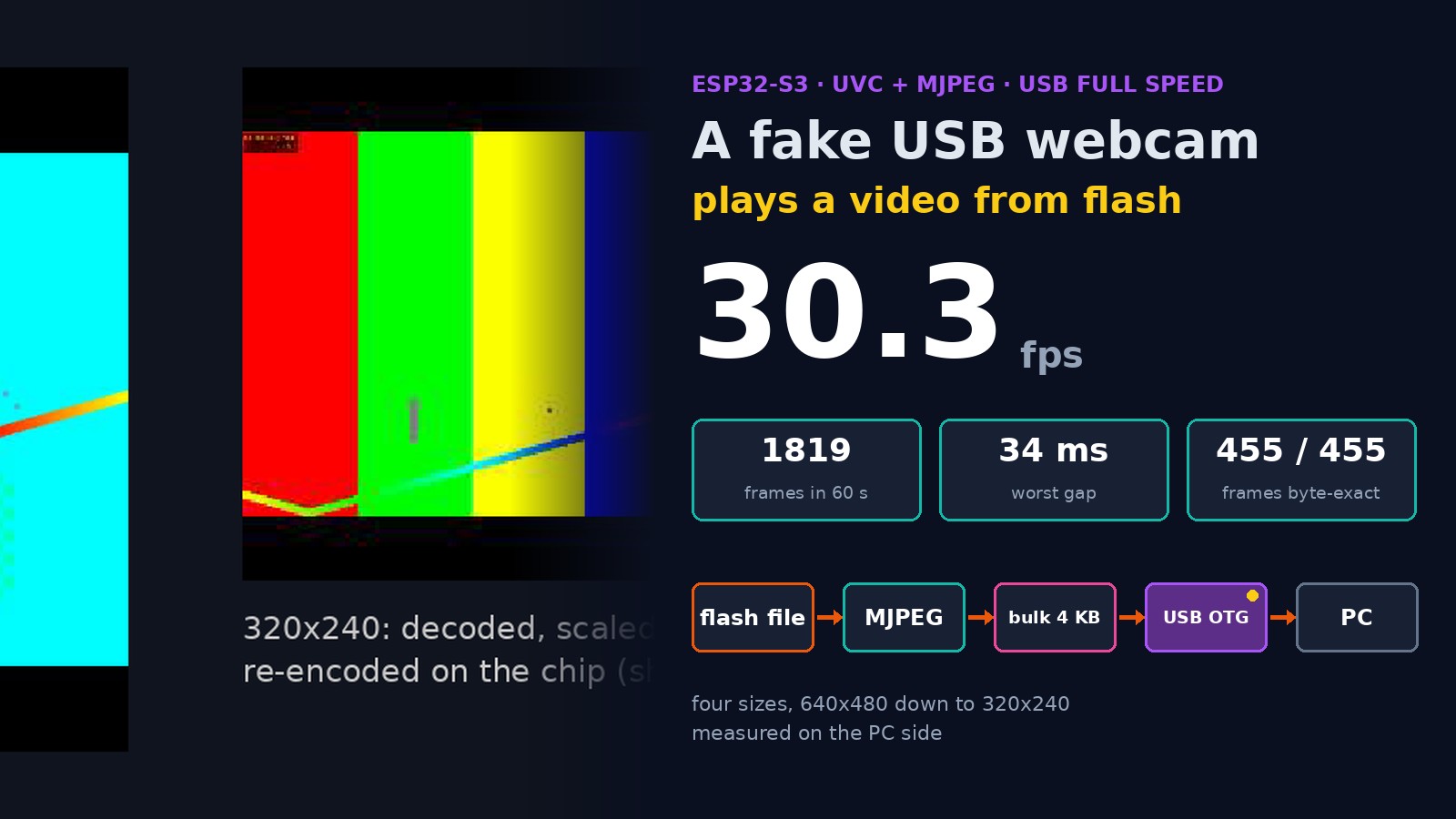 The result first: 30.3 fps, 1819 frames in 60 s, the worst gap 34 ms.
Situation
I wanted a camera I could fully control for testing video code on other boards: same frames every time, a frame counter burnt into the picture, no lighting changes. A real webcam can’t do that. An S3 can, if it shows up on the PC as a normal UVC camera and “films” a video file.
Task
Plug the S3’s native USB port into Linux and get a camera with no driver to install: MJPEG at 640x480, 640x360, 424x240 and 320x240, all at 30 fps, playing an AVI from a FAT partition in the S3’s own flash (or an SD card later). Every frame of the file should go out exactly once.
Action
The board is the 8 MB PSRAM one, on ESP-IDF v6.1 with Espressif’s usb_device_uvc 1.3.1 and
esp_new_jpeg 1.0.2. Two numbers decided the design before I wrote much code.
The first one I got wrong. I took the component’s isochronous payload of 1023 bytes, times 1000
frames per second, and planned for about 1 MB/s. That’s the high-speed value; on full speed the
payload is 512 bytes. I found out when a heavy video (19 KB per frame) only reached 23.8 fps, and went
back to tusb_config.h. I switched to bulk transfers, which retry on a CRC error instead of dropping
the packet, and measured about 600 KB/s. 30 fps then leaves roughly 20 KB per frame, so the budget is
22 000 bytes.
The second was JPEG speed. Espressif’s own tables give about 20 fps decode and 13 fps encode at VGA
on the S3, so re-encoding every frame can’t hold 30 fps. Instead tools/prepare_video.sh turns any
video into four files, one per size, raising ffmpeg’s -q:v until the biggest frame fits the budget.
When the PC asks for a size that has a file, the JPEG bytes go out untouched.
$ QMIN=8 tools/prepare_video.sh testsrc flash_data/video demo 3
demo_640x480.avi   q:v=8  frames=90  max_frame=15280  bytes=1298934
demo_320x240.avi   q:v=8  frames=90  max_frame=6410   bytes=547842
The first version handed the newest frame over through a triple buffer. It looked fine in ffplay
and wasn’t: the producer’s 30.000 fps clock beat against the USB task, which sends every 33 ms (it
computes 333333/10000 in whole milliseconds, so 30.3 fps), and every second or two a frame was repeated
or skipped. I replaced it with a four-slot queue where each USB tick takes the next frame in order.
Two more bugs only showed up once I compared captured frames byte by byte against the file. Two
frames came glued together with exactly 2 extra bytes between the end of one JPEG and the start of
the next. I had assumed a 12-byte UVC payload header; TinyUSB’s is 2 bytes. And when a frame’s last
payload was an exact multiple of 64 bytes, the host never saw a short packet, so it didn’t know the
transfer had ended. vcam_bulk_pad_len() now adds one byte in that case.
With no SD card in, the boot log says what it fell back to:
I (241) esp_psram: Found 8MB PSRAM device
W (1015) storage: no SD card mounted: ESP_ERR_INVALID_RESPONSE
I (1022) storage: flash FAT mounted at /flash
I (1030) webcam: buffers: 3680 KiB of PSRAM
I (1038) webcam: UVC ready: plug the board's native USB port (GPIO19/20) into the host
Result
v4l2-ctl --list-formats-ext shows the four sizes at 30.000 fps, and a capture of 6 s per size
gave 30.3 fps with no wrong-size frame. tools/smooth_test.sh records 12 s through ffmpeg and counts
gaps (a frame more than 50 ms after the previous one). Each row below is one change on top of the
one above:
| Version | Video | fps | Gaps > 50 ms |
|---|---|---|---|
| isochronous + triple buffer | test card, 14 KB/frame | 30.3 | 12 (64 ms each), 71 repeats |
| + bulk, + frame queue | test card | 30.3 | 0, 0 repeats |
| same | heavy video, 19 KB avg | 23.8 | 173 |
| + 4 KB bulk payloads | heavy video | 29.5 | 3 |
| + short-packet pad | heavy video | 29.4 | 0 (max 39 ms) |
| + 22 KB budget, file re-made | heavy video | 30.3 | 0 (max 35 ms) |
| final, 60 s | test card, ~20 loops | 30.32 | 0 (max 34 ms), 1819 frames |
All 455 frames of the padded run matched frames of the file byte for byte. When the chip does have to re-encode (only the 640x480 file present), it takes 74 to 138 ms per frame, so 6.5 to 12.5 new frames a second; the PC still gets 30 fps of repeated frames and the video keeps its real speed, because late frames are dropped without decoding. The picture at the top is frame 30 of both paths.
What I’d do next
720p is out: a watchable 720p JPEG is 60 to 100 KB, three to five times what full speed carries at 30 fps. For 320x240 I could let the decoder scale by 1/2 itself instead of decoding the full frame, which is where most of the 74 ms goes. I haven’t tried it. And the SD card still needs a real card.